
The hardest problem in AI video has always been the same one: keeping a character looking like the same person from start to finish. A face that drifts halfway through a clip makes the whole thing unusable. Seedance 2.5 is built to solve exactly this, and in our own testing it mostly does. This guide explains how consistent character generation works, the tools that control it, and what we found when we pushed it.
We'll cover the reference system, the @character tag, character sheets, and the settings that matter — then show a real test where one face had to survive four full outfit changes.
Why Character Consistency Is So Hard
First, why this is the make-or-break feature. AI video builds a clip frame by frame, and every frame is a fresh prediction. Without something anchoring the person's identity, tiny differences accumulate — the nose shifts, the jaw widens, the hairline creeps — until the face at second 20 isn't the face at second 1. For anything with a recurring character — an ad, a story, a brand spot — that drift is fatal.
A seedance 2.5 consistent character result means the identity holds: same face, same build, same person, no matter how the camera moves or how long the clip runs. Getting there is less about luck and more about feeding the model the right anchors, which is what the rest of this guide is about.
The Reference System Is the Foundation
Everything starts with references. Seedance 2.5 accepts up to 50 multimodal reference inputs — images, video, audio, and more — in a single generation, and this is the main lever for identity. The more clearly you show the model who the person is, the better it holds them.
But more references isn't automatically better. What matters is giving each one a clear job. A few practical rules:
Use clean, high-quality face images. Blurry or low-light references produce a blurry, unstable identity.
Don't overload with near-duplicates. Ten slightly different selfies confuse the model more than two good, distinct shots.
Cover the key angles, not every angle. A clear front view plus one three-quarter or profile shot usually beats a dozen random frames.
Keep the identity references separate from style references. Mixing "this is the person" with "this is the mood" muddies both.
Get the references right and you're most of the way to a consistent character. The tools below are how you point the model at them precisely.
The @character Tag: Binding Identity to a Prompt
This is the piece most people miss. Seedance 2.5's API supports a tagging syntax that links a specific reference to the person in your prompt. Instead of hoping the model figures out who you mean, you tell it directly.
The seedance 2.5 @character syntax works like this: you register a reference, then refer to it in the prompt with a tag. For example, a prompt might read: "@image1 turns to face the camera as the light shifts." The @image1 (or @character:<id>) tag tells the model that the person in this shot is the one from that reference — not a new invention.
A few things to know about the tagging system:
It works across generation modes — text-to-video (T2V), image-to-video (I2V), and multimodal/Omni-Reference prompts all accept it.
You can reference a registered character by ID, so the same person can carry across multiple generations, not just one clip.
When face similarity is the top priority, the tag is what makes the difference between "looks similar" and "is the same person."
If you've struggled with characters that almost match but not quite, the @character tag is usually the fix.
Character Sheets: The Strongest Anchor
For the tightest identity lock, Seedance 2.5 supports character sheets. A seedance 2.5 character sheet is a generated reference layout — front, back, side profile, an action pose, facial expressions, sometimes accessories — built from just one to three photos of a person, output at high resolution.
Here's why it matters. A single photo shows the model one view of a person. A character sheet shows many consistent views at once, so when the model generates new angles and movements, it has a fuller, self-consistent map of that identity to work from. In practice, using a character sheet as the anchor gives tighter face fidelity than a plain reference tag alone.
The workflow is straightforward: generate the character sheet first from your reference photos, then feed that sheet back in as the anchor for your actual video, tagging it in the prompt. It's an extra step, but for serialized content or anything where the face must not drift, it's the most reliable path.
The Three Methods Compared
To make it easy to pick, here's how the main consistency tools stack up.
Method | How strong | Setup effort | Best for |
|---|---|---|---|
Reference images only | Good | Low | Quick clips, one-off shots |
@character / @image1 tag | Strong | Low | Most work — the default choice |
Character sheet as anchor | Strongest | Medium | Serialized content, faces that can't drift |
Fixed camera (add-on) | Boosts any of the above | Low | Shots where camera motion isn't essential |
The simple read: for everyday clips, references plus the @character tag are enough. When the face absolutely cannot change — a series, a recurring brand character — add a character sheet. And a fixed camera stacks on top of any method to reduce drift further. Most people should start with the tag and only add the sheet when a project demands it.
Settings That Help Consistency
A few generation settings quietly support a consistent character.
Fixed camera option. Seedance 2.5 offers a seedance 2.5 fixed camera mode. Locking the camera reduces how much the model has to re-render the subject from new angles, which cuts the chances of identity drift. When consistency matters more than dynamic camerawork, a fixed or minimal camera move is the safer choice.
Clip length and aspect ratio. Longer clips give drift more room to creep in. If you're testing whether an identity holds, start shorter, confirm it's stable, then extend. Set your aspect ratio and duration as generation parameters, not as prompt text.
Video extension. Seedance 2.5 supports a video extension mode to continue a clip. When you extend, keep the same references and character tag so the identity carries into the new segment instead of resetting.
Our Test: One Face, Four Outfits
Theory is one thing; here's what actually happened when we pushed it. We ran a fashion brief through Seedance 2.5 that was designed to stress identity hard: one model walking continuously while four different travel outfits swapped in, one after another, without her walk ever stopping.
That's a brutal test for consistency, because each outfit change is a chance for the model to quietly swap in a different person.
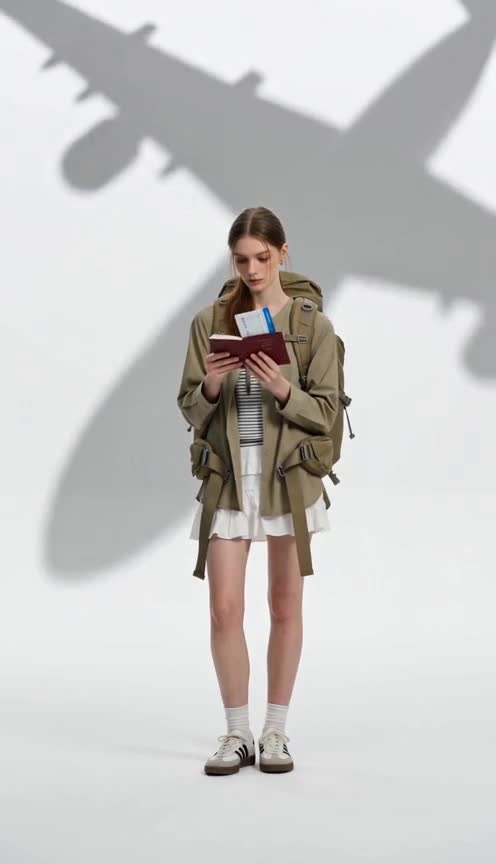
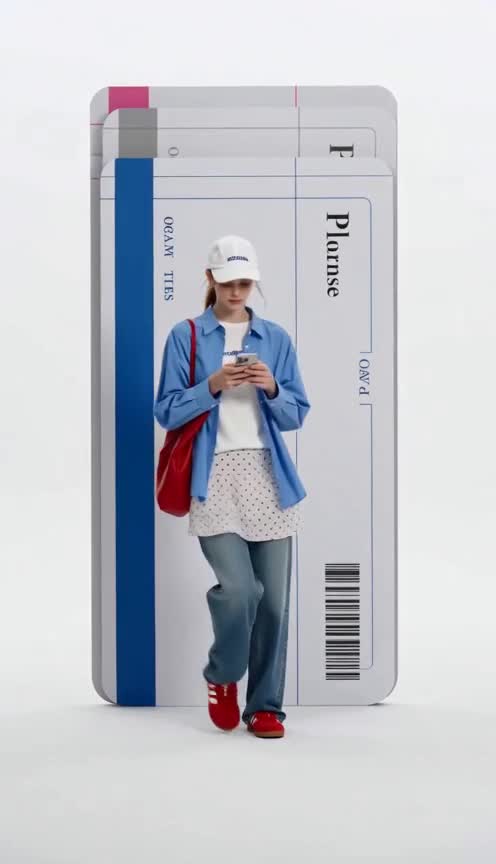

The result: the identity held. Across all four outfit changes, it stayed recognizably the same woman — same face, same build. The model didn't drift into a different person at the transitions, which is exactly where weaker models fail. The walk also stayed continuous, with no freezing at the swaps.
What it cost. Each generation ran about 5 minutes and 30 credits. We needed three attempts to get a clean result — but notably, the retries weren't because of the face. Character consistency worked on the first try. The failures were about on-screen text (garbled boarding-pass graphics), a separate weakness that has nothing to do with identity. So for the specific question this article asks — does Seedance 2.5 keep a consistent character? — the answer in our test was a clear yes.
A Simple Checklist for Consistent Characters
Pulling it together, here's the short version to follow every time:
Gather clean references — a sharp front view plus one profile or three-quarter shot.
Consider a character sheet if the face absolutely cannot drift.
Tag the character with @character or @image1 in your prompt so the model knows who's who.
Prefer a fixed or gentle camera when consistency beats spectacle.
Start short, then extend — confirm the identity is stable before committing to a long clip.
Keep the same references and tag across extensions and follow-up generations.
Follow that and you'll get a stable identity far more often than not.
Where It Still Struggles
An honest guide names the limits. Even with everything set up right, a few things remain harder:
Very small faces. When the person is far from the camera and the face is only a few pixels, detail can wander. Keep the subject reasonably framed if identity matters.
Extreme angle changes. Going from a clean front reference straight to a sharp overhead or back view asks a lot; a character sheet helps here.
On-screen text. Unrelated to identity, but worth repeating from our test: printed text in the frame renders poorly. Add it in post.
None of these undercut the core finding. For normal shots at a normal distance, Seedance 2.5's consistent character generation is strong — as our four-outfit test showed.
How This Compares to Older Models
Briefly, for context. Earlier text-to-video models, including Seedance 2.0, could hold a face for a few seconds but tended to drift over longer clips or across cuts, which is why so much AI video stayed short. The jump to 50 references, the @character tagging system, and character sheets is what moves Seedance 2.5 from "short clips that mostly match" to "a 30-second single take that stays the same person." For a fuller feature breakdown, see our Seedance 2.5 review.
Where Consistent Characters Actually Matter
It's worth naming the jobs where this feature earns its keep, because that's where the setup effort pays off.
Social ads with a spokesperson. A seedance 2.5 for social ads use case usually needs the same face across a hook, a product moment, and a call to action. If the presenter's identity drifts between beats, the ad looks broken. Tag the character and the whole spot holds together.
Serialized content. A recurring host, mascot, or brand character across many videos is only possible if you can summon the same identity on demand. Referencing a character by ID across generations is what makes a series feel like a series.
Fashion and product video. As our test showed, one model across multiple looks is a core fashion need — lookbooks, new-arrival reels, colorway variants. Consistent identity is what lets you build a whole collection's worth of clips around one face.
Short films and narrative. A character who appears in several shots has to be unmistakably the same person, or the story falls apart. This is where character sheets and a steadier camera pay off most.
Across all of these, the pattern is the same: the more a project leans on a recognizable person, the more the reference setup and @character tagging matter. Casual one-off clips can skip it; anything with a repeating face cannot.
Frequently Asked Questions
How do I keep a character consistent in Seedance 2.5? Use clean reference images, tag the person with the @character or @image1 syntax in your prompt, and for the tightest lock, generate a character sheet and use it as the anchor. A fixed camera and shorter clips also reduce drift.
What is the @character tag? It's a syntax in Seedance 2.5 that links a specific reference to the person in your prompt, so the model reuses that exact identity instead of inventing a new face. It works in text-to-video, image-to-video, and multimodal prompts, and you can reference a character by ID across generations.
What is a character sheet? It's a generated reference layout showing one person from multiple angles and expressions, built from one to three photos. Used as the anchor, it gives tighter face fidelity than a single reference, because the model has a fuller, self-consistent view of the identity.
How many references should I use? Quality beats quantity. A sharp front view plus one profile or three-quarter shot is often enough. Seedance 2.5 accepts up to 50, but overloading with near-duplicates can confuse the model rather than help.
Does character consistency actually work? In our test it did. One model stayed recognizably the same person across four full outfit changes in a single continuous clip. The identity held on the first attempt; our retries were caused by unrelated on-screen text issues, not the face.
Does a fixed camera help consistency? Yes. The fixed camera option means the model re-renders the subject from fewer new angles, which reduces the chance of identity drift. Use it when keeping the same face matters more than dynamic camera movement.
Can I keep the same character across multiple videos? Yes. Because you can reference a registered character by ID, the same identity can carry across separate generations — useful for serialized content, campaigns, or a recurring brand character.
Final Thoughts
Consistent characters are the feature that decides whether AI video is a novelty or a real production tool, and it's where Seedance 2.5 puts its focus. The combination that works: clean references, the @character tag to bind identity, a character sheet when the face can't drift, and a steadier camera for the hardest shots. Our own four-outfit test backed it up — the identity held where it counts. Set it up deliberately rather than hoping, and you'll get the same person, take after take. Want to try consistent character generation in Seedance 2.5 yourself?